SQL 2016 Install Sets Multiple TempDB Files
Published: May 07, 2017
This is something that I’ve been hoping would make an appearance in SQL Server at some point, and also why I included my last post about tempDB contention. It’s the ability to choose the number of tempDB files during install rather than having to add them yourself at a later date.
This will be a very short post as, once you’ve read my last post and the related links it includes, you’ll not need too much more information, this is more just to let you know that tempDB file configuration is now included as part of the install.
So here it is:
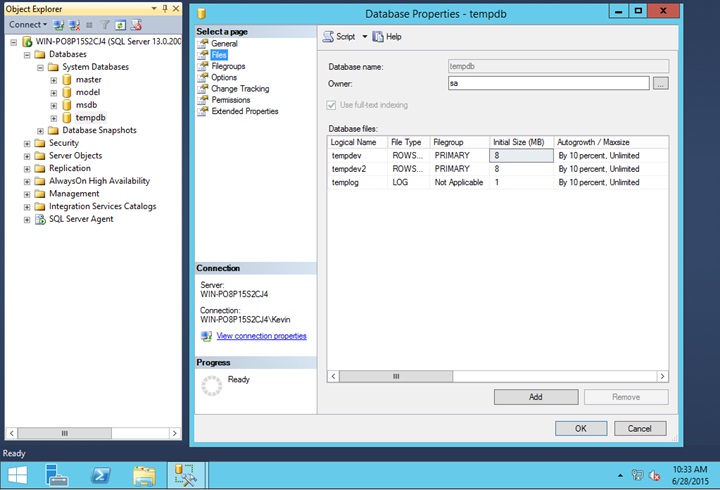
 And once installed, you can see that the tempDB files show as expected.
The only thing that hasn’t changed though, and which you would still need to change post-install is the fact that they are still both created as 8MB in size and they are set to 10% autogrow.
 But other than that, it’s still good that they’ve added it to the install now so that there’s much less messing around required than in older versions, and the fact that it’s mentioned means that people might wonder why (if they don’t know already) and learn about the potential benefits of multiple tempDB files.
This will be a very short post as, once you’ve read my last post and the related links it includes, you’ll not need too much more information, this is more just to let you know that tempDB file configuration is now included as part of the install.
So here it is:
The only thing that hasn’t changed though, and which you would still need to change post-install is the fact that they are still both created as 8MB in size and they are set to 10% autogrow.