Single Value Variables
Published: Jan 06, 2014
These are incredibly useful when writing complex T-SQL or stored procedures etc. as they are very versatile and simple to use. They are also only active and present during the execution of your code. They are automatically dropped and tidied up once execution finishes.
Effectively they are storage in which you can place a value to be used and manipulated throughout your code and refer to it by the variable name.
The best way to explain this is with a simple example. Here we will create a variable called “myNumber” and assign it the value 2. This can then be used in a simple select statement…
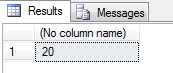 Note the syntax used here… to create a variable we use DECLARE. A variable must always have a name starting with @, and it must also always have a datatype. For example:
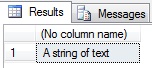 Or if you want to declare multiple variables:
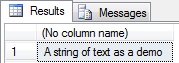 There are also other ways in which to set a value to a variable. If you are using SQL 2008 upwards then you can set the value as part of the declaration:
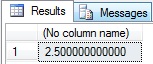 You can also use a SELECT statement:
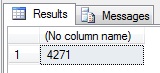 A SELECT can also be used to assign straight from a table:
Once assigned these can be used in a variety of ways which you’ll soon discover as you play with them, but the most common are in a where clause, for creating loops, and in dynamic SQL:
Where Clause:
While Loop:
Dynamic T-SQL:
This should give you enough to work with if you wish to have a play around and see what a variable is, how it works, and what you can do with it and there will also be plenty of code samples and other articles within this website which will utilise variables and let you see them in action.
Effectively they are storage in which you can place a value to be used and manipulated throughout your code and refer to it by the variable name.
The best way to explain this is with a simple example. Here we will create a variable called “myNumber” and assign it the value 2. This can then be used in a simple select statement…
declare @myNumber int
set @myNumber = 2

select @myNumber * 10
declare @myString varchar(20)
set @myString = 'A string of text'

select @myString
declare @myString varchar(20), @myString2 varchar(10)
set @myString = 'A string of text'
set @myString2 = ' as a demo.'

select @myString + @myString2
declare @myNumeric numeric(3, 1) = 5.0, @myInt int = 2

select @myNumeric / @myInt
declare @myDate datetime, @now datetime

select @myDate = '2001-01-01', @now = CURRENT_TIMESTAMP

select DATEDIFF(dd, @myDate, @now)
declare @maxDate date

select @maxDate = MAX(orderDate)
from dbo.orders
Once assigned these can be used in a variety of ways which you’ll soon discover as you play with them, but the most common are in a where clause, for creating loops, and in dynamic SQL:
Where Clause:
declare @myInt int = 1

select *
from inventedTable
where id = @myInt
While Loop:
declare @counter int = 1

while @counter <= (select MAX(id) from myTable)
begin
   update myTable
   set miscValue = RAND() * miscValue
   where id = @counter

   set @counter += 1 -- NOTE: use set @counter = @counter + 1 for SQL 2005
end
Dynamic T-SQL:
declare @mySQL nvarchar(200)

select @mySQL = 'select top 10 * from randomTable where name = '''
       + (select name from nameTable where id = 1) + ''''

exec sp_executeSQL @mySQL
This should give you enough to work with if you wish to have a play around and see what a variable is, how it works, and what you can do with it and there will also be plenty of code samples and other articles within this website which will utilise variables and let you see them in action.