SHRINK a data file? Just say NO!!!
Published: Jun 09, 2014
DBCC SHRINKFILE, DBCC SHRINKDATABASE, and Auto-shrink… they’re all truly, truly evil and should not be allowed near any system… ever!!!
Now, to be fair there are times when shrinking a log file is useful and even necessary. I’ve written my fair share of bug riddled code which has caused the transaction log to spiral into oblivion and leave me with a 20GB data file and 500GB of logs. In that case… shrink away. It’s really quite handy. But data files… no… just no… again no… please just no!!!!!!
This particular problem arose the other day when I was talking to someone who had a data drive with numerous databases and on which he then created a 150GB database housing, amongst others, an 80GB table.
There was no problem so far as the drive was 400GB in size and after adding this new database he still had 90GB free space. Everyone was happy and his capacity planning said there would be no issues for a good while to come. However, what he had failed to consider in his capacity planning model was the impact of rebuilding an index.
Effectively, when doing a clustered index rebuild, SQL Server will make a copy of your clustered index (which is the entire table, remember) and then once happy it’s sorted will swap it out for your existing data. Not 100% accurate, but gives the gist.
Anyway, this meant that in the case above, the 150GB database swelled to 230GB after a rebuild of the clustered index on the 80GB table. Suddenly all capacity plans went out of the window and the drive only had 10GB left. Not good. So to counter this, he was performing a shrink on the datafile to reduce it back to 150GB.
Sounds sensible, but his performance went through the floor and he couldn’t understand why. Well… here’s why you should avoid shrinking a database at all costs…
Let’s create a basic test database:
Now, using this we’ll create a table in which I’ve made each row purposely large so that it covers numerous pages in the database and therefore gives us some good metadata. Also note that I’m using an identity(1, 2) so that it only populates every other identity value starting from 1…
So, as you can see, there’s a clustered index on the table and with this database being brand new, there’s only going to be one index listed in the DMV. So let’s have a look at the fragmentation…
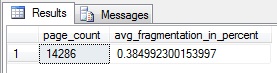
As we’d expect, with having inserted data into an identity column, there’s almost zero fragmentation.
So now we’re going to perform some inserts to fill in some of the gaps in the identity key which will purposely cause some page splits inside the database.
So now let’s have a look at the index…

Well we’ve fragmented our index so it’s time for a rebuild. Let’s have a quick check on the database and table size before we do…
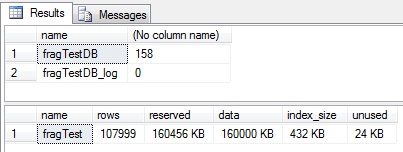
Okay… rebuild…
Check on the indexes again…
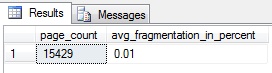
Well we couldn’t be happier with those results. Pretty much 0% fragmentation. Now let’s look at our database sizes…
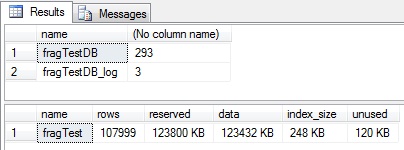
Ouch. Our database has, as predicted, grown massively and is now 290GB in size but only using 125GB in the table. We don’t have that kind of capacity on the server, so let’s shrink the data file back down again…
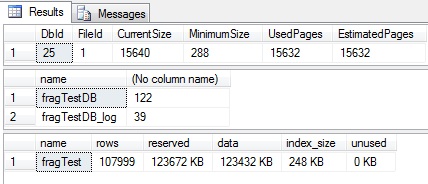
All looks good. Exactly what we wanted. We’ve performed a rebuild and removed the unused space. But at what cost?
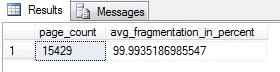
OUCH!!!!!!!!! What on earth has happened?
Well, simply put, SQL Server isn’t very helpful when it conducts a shrink.
What has happened is that SQL Server has made a copy of the clustered index (data table) and therefore the database has expanded and SQL Server has used that space in which to place the copy. Once created it then marks the pages used by the original index as unused. As such we now have a data file with a LOT of blank pages at the start, and used pages at the end.
The problem is that the SHRINK operation (all of them function in the same way) will take the last non-empty page in the datafile and move it to the front… then next non-empty page to 2nd from the front, the next to 3rd from the front etc. and it continues to do this until it has all used data pages at the front of the file and all empty ones at the end. Then it gives the blank space back to the Operating System.
Therefore it has literally reversed the data pages in moving them to the front of the data file. As such our perfect index has now become almost perfectly fragmented and performance drops through the floor.
Aside from this utter destruction of indexes, it’s also advisable to note that this will hit your disk IO hard and is a fully logged operation, therefore if the original example above were in the full recovery mode the transaction log would have grown by a good 120GB as well which is not only painful on the disks when backing up but if you happen to be running transactional replication as well then your log reader really won’t appreciate it either!
Luckily, in the example at the top of this article, the guy was able to relocate his entire database to a new, larger drive and not have to consider shrinking after the index maintenance.
However, you may not be so lucky and the only real way I know to avoid this is to create a new filegroup and rebuild your index to the new filegroup. You can then drop the old filegroup, freeing up space without affecting the new index.
Basically though, the main thing to take away is simply DO NOT SHRINK DATABASES!!!
Now, to be fair there are times when shrinking a log file is useful and even necessary. I’ve written my fair share of bug riddled code which has caused the transaction log to spiral into oblivion and leave me with a 20GB data file and 500GB of logs. In that case… shrink away. It’s really quite handy. But data files… no… just no… again no… please just no!!!!!!
This particular problem arose the other day when I was talking to someone who had a data drive with numerous databases and on which he then created a 150GB database housing, amongst others, an 80GB table.
There was no problem so far as the drive was 400GB in size and after adding this new database he still had 90GB free space. Everyone was happy and his capacity planning said there would be no issues for a good while to come. However, what he had failed to consider in his capacity planning model was the impact of rebuilding an index.
Effectively, when doing a clustered index rebuild, SQL Server will make a copy of your clustered index (which is the entire table, remember) and then once happy it’s sorted will swap it out for your existing data. Not 100% accurate, but gives the gist.
Anyway, this meant that in the case above, the 150GB database swelled to 230GB after a rebuild of the clustered index on the 80GB table. Suddenly all capacity plans went out of the window and the drive only had 10GB left. Not good. So to counter this, he was performing a shrink on the datafile to reduce it back to 150GB.
Sounds sensible, but his performance went through the floor and he couldn’t understand why. Well… here’s why you should avoid shrinking a database at all costs…
Let’s create a basic test database:
if exists(select * from sys.databases where name = 'fragTestDB')
   drop database fragTestDB
go

create database fragTestDB
go
Now, using this we’ll create a table in which I’ve made each row purposely large so that it covers numerous pages in the database and therefore gives us some good metadata. Also note that I’m using an identity(1, 2) so that it only populates every other identity value starting from 1…
use fragTestDB
go

if object_id('fragTest') is not null drop table fragTest
go

create table dbo.fragTest
(
   id int identity(1, 2),
   value char(1000) default('a'),
   constraint pk_fragTest primary key clustered(id)
)
go

set nocount on
insert into fragTest default values
go 100000
So, as you can see, there’s a clustered index on the table and with this database being brand new, there’s only going to be one index listed in the DMV. So let’s have a look at the fragmentation…
declare @db int = (select database_id from sys.databases where name = 'fragTestDB')

select page_count, avg_fragmentation_in_percent
from sys.dm_db_index_physical_stats(@db, null, null, null, null)
As we’d expect, with having inserted data into an identity column, there’s almost zero fragmentation.
So now we’re going to perform some inserts to fill in some of the gaps in the identity key which will purposely cause some page splits inside the database.
declare @id int = 14
while @id <= 80000
begin
   set identity_insert fragTest on
   insert into fragTest(id, value)
   select @id, 'b'
   set identity_insert fragTest off

   set @id += 10
end
So now let’s have a look at the index…
declare @db int = (select database_id from sys.databases where name = 'fragTestDB')

select page_count, avg_fragmentation_in_percent
from sys.dm_db_index_physical_stats(@db, null, null, null, null)
Well we’ve fragmented our index so it’s time for a rebuild. Let’s have a quick check on the database and table size before we do…
select name, (size*8)/1024 from sys.master_files where db_name(database_id) = 'fragTestDB'

exec sp_spaceUsed 'fragTest'
Okay… rebuild…
alter index pk_fragTest on fragTest rebuildCheck on the indexes again…
declare @db int = (select database_id from sys.databases where name = 'fragTestDB')

select page_count, avg_fragmentation_in_percent
from sys.dm_db_index_physical_stats(@db, null, null, null, null)
Well we couldn’t be happier with those results. Pretty much 0% fragmentation. Now let’s look at our database sizes…
select name, (size*8)/1024 from sys.master_files where db_name(database_id) = 'fragTestDB'

exec sp_spaceUsed 'fragTest'
Ouch. Our database has, as predicted, grown massively and is now 290GB in size but only using 125GB in the table. We don’t have that kind of capacity on the server, so let’s shrink the data file back down again…
dbcc shrinkfile('fragTestDB')

select name, (size*8)/1024 from sys.master_files where db_name(database_id) = 'fragTestDB'

exec sp_spaceUsed 'fragTest'
All looks good. Exactly what we wanted. We’ve performed a rebuild and removed the unused space. But at what cost?
declare @db int = (select database_id from sys.databases where name = 'fragTestDB')

select page_count, avg_fragmentation_in_percent
from sys.dm_db_index_physical_stats(@db, null, null, null, null)
OUCH!!!!!!!!! What on earth has happened?
Well, simply put, SQL Server isn’t very helpful when it conducts a shrink.
What has happened is that SQL Server has made a copy of the clustered index (data table) and therefore the database has expanded and SQL Server has used that space in which to place the copy. Once created it then marks the pages used by the original index as unused. As such we now have a data file with a LOT of blank pages at the start, and used pages at the end.
The problem is that the SHRINK operation (all of them function in the same way) will take the last non-empty page in the datafile and move it to the front… then next non-empty page to 2nd from the front, the next to 3rd from the front etc. and it continues to do this until it has all used data pages at the front of the file and all empty ones at the end. Then it gives the blank space back to the Operating System.
Therefore it has literally reversed the data pages in moving them to the front of the data file. As such our perfect index has now become almost perfectly fragmented and performance drops through the floor.
Aside from this utter destruction of indexes, it’s also advisable to note that this will hit your disk IO hard and is a fully logged operation, therefore if the original example above were in the full recovery mode the transaction log would have grown by a good 120GB as well which is not only painful on the disks when backing up but if you happen to be running transactional replication as well then your log reader really won’t appreciate it either!
Luckily, in the example at the top of this article, the guy was able to relocate his entire database to a new, larger drive and not have to consider shrinking after the index maintenance.
However, you may not be so lucky and the only real way I know to avoid this is to create a new filegroup and rebuild your index to the new filegroup. You can then drop the old filegroup, freeing up space without affecting the new index.
Basically though, the main thing to take away is simply DO NOT SHRINK DATABASES!!!