How Big Are Our Tables?
Published: Oct 21, 2026
This is another query that I’ve been asked… although I have to admit that I’m a little confused as to why because there’s a built in report that achieves the same result… but I’ve never shied away from a challenge, so I was happy to oblige.
Basically what the asker required was a simple table which returned the output of sp_spaceUsed in a table and for every table in the database…
The reason that I say this wasn’t really needed was because there is a built in SSRS report which will do this exact task for you…
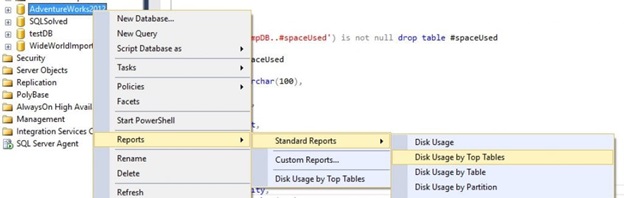
If you were to select this report you would see the following (well, if you had my exact database… but you know what I’m getting at)…
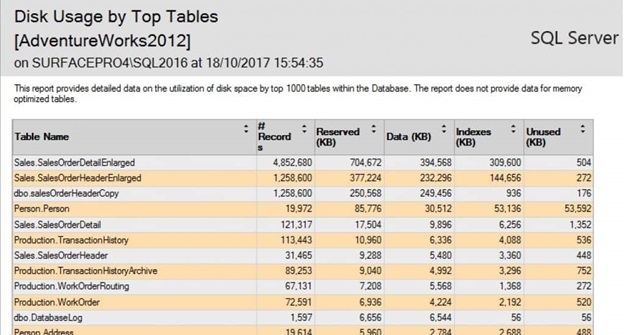
But, as I mentioned, the request was to get this in a tabular form… which I admit is easier to manipulate, so I was happy to give it a go…
I didn’t choose to exactly manipulate the code the report ran but instead simply used the sp_spaceUsed function that already exists (I could have used the code that it runs, but that seemed overkill).
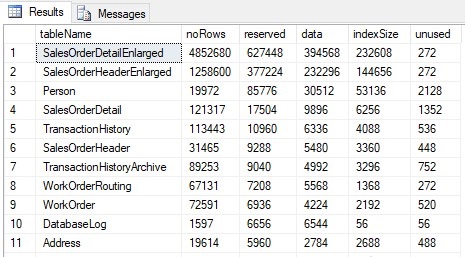
Using the above you can now get all the data you require in a table and therefore you can manipulate it to your heart’s content. You can order by size, by index, or just sum up the total size of your indexes, data, or tables in your database.
Hopefully you’ll find it useful because, due to the datatypes on offer, it was quite fun to write.
Basically what the asker required was a simple table which returned the output of sp_spaceUsed in a table and for every table in the database…
The reason that I say this wasn’t really needed was because there is a built in SSRS report which will do this exact task for you…
If you were to select this report you would see the following (well, if you had my exact database… but you know what I’m getting at)…
But, as I mentioned, the request was to get this in a tabular form… which I admit is easier to manipulate, so I was happy to give it a go…
I didn’t choose to exactly manipulate the code the report ran but instead simply used the sp_spaceUsed function that already exists (I could have used the code that it runs, but that seemed overkill).
if object_id('tempDB..#spaceUsed') is not null drop table #spaceUsed

create table #spaceUsed
(
       tableName varchar(100),
       noRows int,
       reserved int,
       data int,
       indexSize int,
       unused int
)

declare @tables table
(
       id int identity,
       tableName varchar(100)
)
insert into @tables
select '[' + s.name + '].[' + o.name + ']'
from sys.tables o
join sys.schemas s
on s.schema_id = o.schema_id

declare @spaceUsed table
(
       tableName varchar(100),
       noRows int,
       reservedData varchar(100),
       dataData varchar(100),
       indexSizeData varchar(100),
       unusedData varchar(100)
)

declare @sql varchar(max), @counter int = 1

while @counter <= (select max(id) from @tables)
begin
       select @sql = 'exec sp_spaceUsed ''' + tableName + ''''
       from @tables
       where id = @counter
       insert into @spaceUsed
       exec (@sql)

       insert into #spaceUsed
       select tableName, noRows, substring(reservedData, 1, charindex(' ', reservedData, 1)),
                     substring(dataData, 1, charindex(' ', dataData, 1)),
                     substring(indexSizeData, 1, charindex(' ', indexSizeData, 1)),
                     substring(unusedData, 1, charindex(' ', unusedData, 1))
       from @spaceUsed

       delete from @spaceUsed

       select @counter += 1
end

select *
from #spaceUsed
order by reserved desc
go
Using the above you can now get all the data you require in a table and therefore you can manipulate it to your heart’s content. You can order by size, by index, or just sum up the total size of your indexes, data, or tables in your database.
Hopefully you’ll find it useful because, due to the datatypes on offer, it was quite fun to write.