DATEADD, DATEPART, and DATEDIFF
Published: Sep 16, 2013
I’ve always found that no matter what I end up coding, I always have to manipulate a date or two. Whether it’s finding last week’s date, extracting the minute from a datetime, or calculating how long someone has taken between orders, it always comes down to manipulating dates.
All of the following functions use the same set of intervals. The most common are as follows:
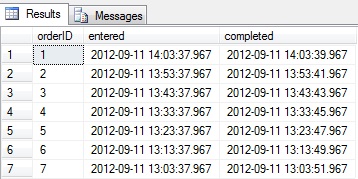
This is the easiest and most common way to work with intervals and we'll also use this function right away in order to generate a simple table that we can use for the examples in this section.
Also note the use of CURRENT_TIMESTAMP which is also a built in function and provides us with the current datetime of the SQL Server.
For example, say you want to see all orders placed in the last hour... (note you need to append these examples to the table create code above)
 Or maybe there has been a mistake and you want to increase all dates in your table by 90 mins...
As this clearly shows, the DATEADD function works by specifying your interval, the quantity (which can be positive or negative), and the starting value.
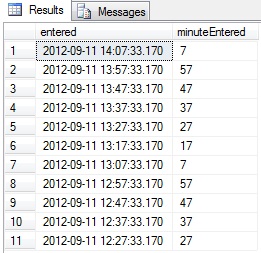
This function will use your interval input to extract the relevant part of the datetime you pass in. Therefore, if you wish to extract the minutes from a set of times, you could use the following:
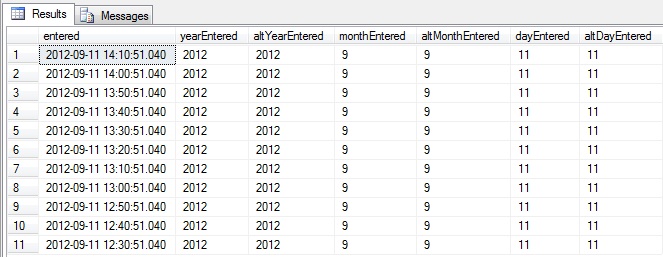
 It's also good to note that for some of these there are other functions that will achieve the same goal. These are YEAR, MONTH, and DAY. For example:
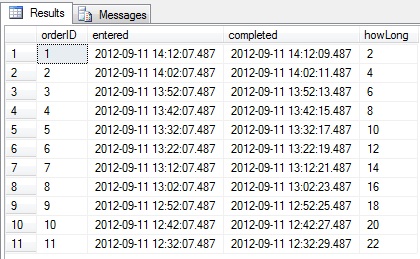
If you need to know how many seconds, minutes, hours etc apart two datetimes are, then this is the way to do it. For example, let's see how many seconds it took each order to go from Entered to Completed in our fake order table:
 As you can see, these are very useful functions and I would advise playing around with them a little to make sure you fully understand all the uses and intervals so that you can start to use them in your code.
All of the following functions use the same set of intervals. The most common are as follows:
- SS = seconds
- N = minutes
- HH = hours
- DD = days
- MM = months
- YY = years
DATEADD
This is the easiest and most common way to work with intervals and we'll also use this function right away in order to generate a simple table that we can use for the examples in this section.
Also note the use of CURRENT_TIMESTAMP which is also a built in function and provides us with the current datetime of the SQL Server.
declare @orders table
(
   orderID int identity(1, 1) not null,
   entered datetime not null,
   completed datetime null
)
insert into @orders(entered) select CURRENT_TIMESTAMP

declare @counter int = 1
while @counter <= 10
begin
   insert into @orders(entered)
   select DATEADD(N, -10, entered)
   from @orders
   where orderID =
   (
       select MAX(orderID)
       from @orders
   )

   set @counter += 1
end

update @orders
set completed = dateadd(ss, orderID*2, entered)

select *
from @orders
For example, say you want to see all orders placed in the last hour... (note you need to append these examples to the table create code above)
select *
from @orders
where entered >= DATEADD(hh, -1, current_timestamp)
update @orders
set entered = DATEADD(n, 90, entered),
   completed = DATEADD(n, 90, completed)
As this clearly shows, the DATEADD function works by specifying your interval, the quantity (which can be positive or negative), and the starting value.
DATEPART
This function will use your interval input to extract the relevant part of the datetime you pass in. Therefore, if you wish to extract the minutes from a set of times, you could use the following:
select entered, DATEPART(n, entered) as minuteEntered
from @orders
select entered,
       DATEPART(yy, entered) as yearEntered, YEAR(entered) as altYearEntered,
       DATEPART(MM, entered) as monthEntered, MONTH(entered) as altMonthEntered,
       DATEPART(DD, entered) as dayEntered, DAY(entered) as altDayEntered
from @orders
DATEDIFF
If you need to know how many seconds, minutes, hours etc apart two datetimes are, then this is the way to do it. For example, let's see how many seconds it took each order to go from Entered to Completed in our fake order table:
select *, DATEDIFF(ss, entered, completed) as howLong
from @orders