Lead and Lag Built In Functions
Published: Nov 06, 2016
These aren’t new functions as they were brought in for SQL 2012, but I was using them the other day in a SQL 2014 environment and the person I was talking to at the time had never heard of them, so I thought I’d make mention of them here in case other people hadn’t heard of them either.
These are basically functions along the same line as RANK and ROW_NUMBER in that they take an OVER clause.
Their purpose is to basically prevent self-join queries when comparing datasets to themselves.
Sounds confusing, but you’ll see what I mean…
Using my extended AdventureWorks (as usual) we want to compare the total sales amount for each day with the respective previous days total sales amount.
Basically we want to do something like this:
What we’re interested in is the last query which produces our results by performing a self-join on the temporary orders table.
This can be quite a heavy task (in this case not because it’s a small table of only around 2000 records, but it will still demonstrate performance well enough).
We’re joining the table to itself:
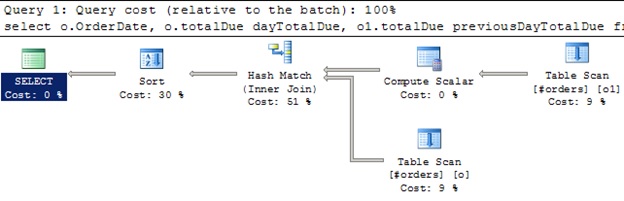 And in this case we’re scanning the orders table twice (makes sense) and we also require two internal tables to be created and used in the background…
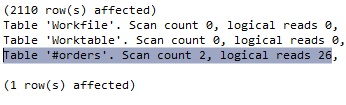 So how else could we write this? Well the easiest way is using LAG:
For reference, the column in the lag function itself is the column we want to align, in this case totalDue. And the number 1 means that we want to shift it by 1 row. If we placed 2 there we could compare each date’s totals to those 2 days prior.
Hopefully that makes sense.
Well this is the outcome of this query:
 It’s much longer, but you can see that we only hit the #orders table once.
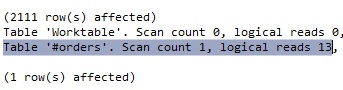 As we expected… we just scanned the table once, therefore halving the reads and we also only used 1 internal table. Therefore this is much more efficient.
Let’s now consider something else… let’s compare each day to the day before and the following day…
Now this is starting to get a little messy. The SQL is growing, joins are getting confusing, and the execution plan, as expected, shows 3 table scans:
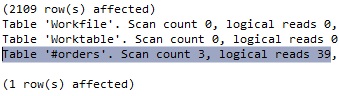
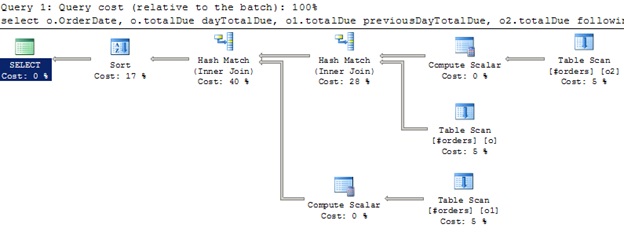 Which is reflected in the stats:
 So now let’s use our new functions… both Lead and Lag:
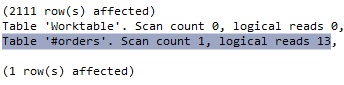
Much neater SQL and we only scan the table once:
 The other thing to note is that the Lead and Lag functions do return the values in which there is no match… like an outer join…
 In my old style query these wouldn’t appear. Therefore you would need to remove them in the where clause if you wished.
The other option is that you can simply have them listed as 0 if you want by adding a parameter to the Lag and Lead functions (you can use any value you like, I’m just choosing 0):
And this will solve your problem:
 I would definitely recommend using this over the old style for any comparison queries like the above. It’s much more efficient and I don’t (yet at least) know of any gotchas to worry about with it.
These are basically functions along the same line as RANK and ROW_NUMBER in that they take an OVER clause.
Their purpose is to basically prevent self-join queries when comparing datasets to themselves.
Sounds confusing, but you’ll see what I mean…
Using my extended AdventureWorks (as usual) we want to compare the total sales amount for each day with the respective previous days total sales amount.
Basically we want to do something like this:
use AdventureWorks2014
go

if object_id('tempDB..#orders') is not null
   drop table #orders

select row_number() over(order by orderDate) id,
       orderDate, sum(TotalDue) totalDue
into #orders
from sales.SalesOrderHeaderEnlarged
group by orderDate
go

select o.OrderDate, o.totalDue dayTotalDue, o1.totalDue previousDayTotalDue
from #orders o
join #orders o1
on o.id = o1.id + 1
order by o.id
What we’re interested in is the last query which produces our results by performing a self-join on the temporary orders table.
This can be quite a heavy task (in this case not because it’s a small table of only around 2000 records, but it will still demonstrate performance well enough).
We’re joining the table to itself:
select OrderDate, totalDue dayTotal,
       lag(totalDue, 1) over(order by orderDate) previousDayTotalDue
from #orders
order by id
For reference, the column in the lag function itself is the column we want to align, in this case totalDue. And the number 1 means that we want to shift it by 1 row. If we placed 2 there we could compare each date’s totals to those 2 days prior.
Hopefully that makes sense.
Well this is the outcome of this query:
Let’s now consider something else… let’s compare each day to the day before and the following day…
select o.OrderDate, o.totalDue dayTotalDue, o1.totalDue previousDayTotalDue,
       o2.totalDue followingDayTotalDue
from #orders o
join #orders o1
on o.id = o1.id + 1
join #orders o2
on o.id = o2.id - 1
order by o.id
Now this is starting to get a little messy. The SQL is growing, joins are getting confusing, and the execution plan, as expected, shows 3 table scans:
select OrderDate, totalDue dayTotal,
       lag(totalDue, 1) over(order by orderDate) previousDayTotalDue,
       lead(totalDue, 1) over(order by orderDate) followingDayTotalDue
from #orders
order by id
Much neater SQL and we only scan the table once:
The other option is that you can simply have them listed as 0 if you want by adding a parameter to the Lag and Lead functions (you can use any value you like, I’m just choosing 0):
select OrderDate, totalDue dayTotal,
       lag(totalDue, 1, 0) over(order by orderDate) previousDayTotalDue,
       lead(totalDue, 1, 0) over(order by orderDate) followingDayTotalDue
from #orders
order by id
And this will solve your problem: