Creating a Partitioned View
Published: Apr 23, 2017
This is an alternative to native table Partitioning, and something I would potentially rather use instead whether I have Enterprise Edition or not.
Partitioned Views are also available in any edition, which is always a bonus.
The problem people tend to have with these are simply that there are a few annoying rules around their usage but, once you’re past those, these are very powerful and handy things to use.
So what are some of the biggest things to note when planning to use a partitioned view?
Firstly you need a partitioning column. That’s the column which you use to ensure that data can only be placed in one table or another, not in multiple tables. Therefore this is the column on which we will define our partitioning constraint.
Secondly, the partitioning column must be a part of the primary key.
Lastly, if you want to be able to insert data into your partitioned view, then your underlying tables can’t have an identity column.
There are more considerations, but these are the main three I come across and which tend to trip people up.
Let’s create a quick partitioned view, following the rules above, and showing that the view can then function almost seamlessly as a table, allowing for Inserts, Updates, and Deletes…
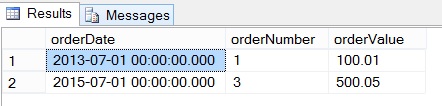
Now we have our partitioned view we can perform Inserts, Updates, and Deletes as expected:
Partitioned Views are also available in any edition, which is always a bonus.
The problem people tend to have with these are simply that there are a few annoying rules around their usage but, once you’re past those, these are very powerful and handy things to use.
So what are some of the biggest things to note when planning to use a partitioned view?
Firstly you need a partitioning column. That’s the column which you use to ensure that data can only be placed in one table or another, not in multiple tables. Therefore this is the column on which we will define our partitioning constraint.
Secondly, the partitioning column must be a part of the primary key.
Lastly, if you want to be able to insert data into your partitioned view, then your underlying tables can’t have an identity column.
There are more considerations, but these are the main three I come across and which tend to trip people up.
Let’s create a quick partitioned view, following the rules above, and showing that the view can then function almost seamlessly as a table, allowing for Inserts, Updates, and Deletes…
if object_id('testPartitionedView') is not null drop view testPartitionedView
if object_id('testOrders2013') is not null drop table testOrders2013
if object_id('testOrders2014') is not null drop table testOrders2014
if object_id('testOrders2015') is not null drop table testOrders2015
go

-- create the underlying tables (very basic ones)

create table testOrders2013
(
   orderDate datetime not null,
   orderNumber int not null,
   orderValue decimal(10, 2) not null
)
create table testOrders2014
(
   orderDate datetime not null,
   orderNumber int not null,
   orderValue decimal(10, 2) not null
)
create table testOrders2015
(
   orderDate datetime not null,
   orderNumber int not null,
   orderValue decimal(10, 2) not null
)
go

-- partitioning constraint on orderDate

alter table testOrders2013 add constraint ct_Order2013 check (orderDate between '2013-01-01' and '2013-12-31')
alter table testOrders2014 add constraint ct_Order2014 check (orderDate between '2014-01-01' and '2014-12-31')
alter table testOrders2015 add constraint ct_Order2015 check (orderDate between '2015-01-01' and '2015-12-31')
go

-- add the primary keys to the table (using the partitioning column)

alter table testOrders2013 add constraint pk_Order2013 primary key clustered(orderDate, orderNumber)
alter table testOrders2014 add constraint pk_Order2014 primary key clustered(orderDate, orderNumber)
alter table testOrders2015 add constraint pk_Order2015 primary key clustered(orderDate, orderNumber)
go

-- create the view

create view testPartitionedView
as
   select orderDate, orderNumber, orderValue
   from testOrders2013
   union all
   select orderDate, orderNumber, orderValue
   from testOrders2014
   union all
   select orderDate, orderNumber, orderValue
   from testOrders2015
go
Now we have our partitioned view we can perform Inserts, Updates, and Deletes as expected:
-- data manipulation

insert into testPartitionedView select '2013-07-01', 1, 100.01
insert into testPartitionedView select '2014-07-01', 2, 101.01
insert into testPartitionedView select '2015-07-01', 3, 102.01
go

update testPartitionedView set orderValue = 500.05 where orderNumber = 3
go

delete from testPartitionedView where orderNumber = 2
go

-- end result as expected

select *
from testPartitionedView
go