Basic SELECT statement (with WHERE clause)
Published: Jul 08, 2013
This article is a simple and brief introduction to the SELECT statement within SQL Server. This is the most basic and most useful tool in the SQL language. It allows us to see what data is being held in our databases.
This is the manner in which we retrieve data from our database tables. As the name implies, we simply SELECT that data from a table. It’s that easy.
If you have not read the Basic INSERT Statement document then please run the following code as we will use the resulting table in our examples:
Firstly we’ll cover the most basic SELECT statement of them all… simply retrieving all columns from the table. To do this we use a special character, the star… *. In SQL Server, * simply means “all”…
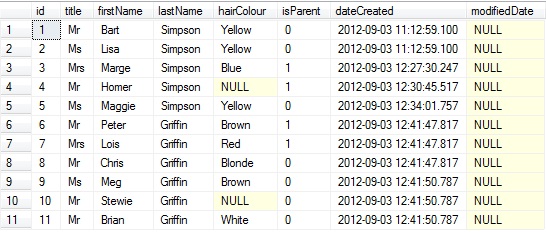 This is a very quick and dirty way of seeing all the data in a table, but it is not a recommended practice. In fact, using *is generally frowned upon and using it is not a habit you should enter.
If you do wish to see every column in a table though, and with a sample of the data it contains, then * is your friend, but only when limited. For example you could have a table with 100 million rows… running “select * from table” could grind your system to a halt. Much better is to select a small portion just to get a feel for the data inside:
This will simply return the first 2 rows that SQL comes across (note that this is NOT order specific… it literally is the first 2 rows that SQL happens to find in the table. An order is more likely where clustered indexes are present, but that’s a whole separate discussion).
 Anyway, it’s not likely that you will always want all the columns returned and therefore you can limit your result set by specifying your columns as required:
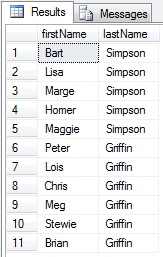 As you can see, getting the results you want is actually very straight forward.
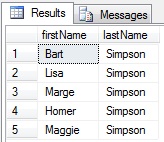
In addition to this, what if you only wanted to return data for someone with the lastName of Simpson… that’s when the WHERE clause comes in as it allows you to filter data:
 You also don’t have to have the filter column in the select list. Here we’ll simply filter by the “isParent” flag:
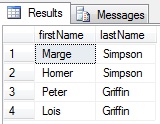 As you can see, it’s incredibly easy to get some very specific data without much effort. You can also combine filter clauses… in this example we’ll get all parents with blue hair:
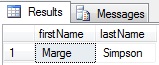 It’s as simple as that. The only additional things I’d like to mention are that when using “null” you need to use “is” or “is not” rather than “=”…
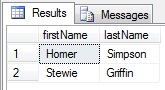 And that you can use “between” with dates:
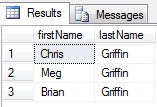
So, as one last query, let’s select all non-parents with a lastName of Griffin and who have hair…
This is the manner in which we retrieve data from our database tables. As the name implies, we simply SELECT that data from a table. It’s that easy.
If you have not read the Basic INSERT Statement document then please run the following code as we will use the resulting table in our examples:
if OBJECT_ID('dbo.person') is not null drop table dbo.person
go

create table dbo.person
(
   id smallint identity(1, 1) not null,
   title varchar(4) not null,
   firstName varchar(20) not null,
   lastName varchar(30) not null,
   hairColour varchar(10) null,
   isParent bit not null,
   dateCreated datetime not null default(current_timestamp),
   modifiedDate datetime null,
   constraint pk_person primary key (id)
)
insert into dbo.person
select 'Mr', 'Bart', 'Simpson', 'Yellow', 0, CURRENT_TIMESTAMP, null union all
select 'Ms', 'Lisa', 'Simpson', 'Yellow', 0, CURRENT_TIMESTAMP, null union all
select 'Mrs', 'Marge', 'Simpson', 'Blue', 1, CURRENT_TIMESTAMP, null union all
select 'Mr', 'Homer', 'Simpson', null, 1, CURRENT_TIMESTAMP, null union all
select 'Ms', 'Maggie', 'Simpson', 'Yellow', 0, CURRENT_TIMESTAMP, null union all
select 'Mr', 'Peter', 'Griffin', 'Brown', 1, CURRENT_TIMESTAMP, null union all
select 'Mrs', 'Lois', 'Griffin', 'Red', 1, CURRENT_TIMESTAMP, null union all
select 'Mr', 'Chris', 'Griffin', 'Blonde', 0, CURRENT_TIMESTAMP, null union all
select 'Ms', 'Meg', 'Griffin', 'Brown', 0, CURRENT_TIMESTAMP, null union all
select 'Mr', 'Stewie', 'Griffin', null, 0, CURRENT_TIMESTAMP, null union all
select 'Mr', 'Brian', 'Griffin', 'White', 0, CURRENT_TIMESTAMP, null
Firstly we’ll cover the most basic SELECT statement of them all… simply retrieving all columns from the table. To do this we use a special character, the star… *. In SQL Server, * simply means “all”…
select *
from dbo.person
If you do wish to see every column in a table though, and with a sample of the data it contains, then * is your friend, but only when limited. For example you could have a table with 100 million rows… running “select * from table” could grind your system to a halt. Much better is to select a small portion just to get a feel for the data inside:
select top 2 *
from dbo.person
This will simply return the first 2 rows that SQL comes across (note that this is NOT order specific… it literally is the first 2 rows that SQL happens to find in the table. An order is more likely where clustered indexes are present, but that’s a whole separate discussion).
select firstName, lastName
from dbo.person
In addition to this, what if you only wanted to return data for someone with the lastName of Simpson… that’s when the WHERE clause comes in as it allows you to filter data:
select firstName, lastName
from dbo.person
where lastName = 'Simpson'
select firstName, lastName
from dbo.person
where isParent = 1
select firstName, lastName
from dbo.person
where isParent = 1
and hairColour = 'Blue'
select firstName, lastName
from dbo.person
where hairColour is null
select firstName, lastName
from dbo.person
where dateCreated between '2012-01-01 00:00:00' and '2022-12-31 00:00:00'
select firstName, lastName
from dbo.person
where isParent = 0
and lastName = 'Griffin'
and hairColour is not null